About Me
I design and build practical, end-to-end systems that automate real-world workflows. My work focuses on backend APIs, background workers, and media delivery pipelines, combining ASP.NET Core, PowerShell, and self-hosted infrastructure to create reliable platforms. I work across the full system lifecycle — from data ingestion and processing to deployment, operation, and ongoing refinement.
Core Skills
Backend & API Development
- C# / ASP.NET Core: REST APIs, background services, system integration
- Authentication & Security: Session management, IP-based access control, protected endpoints
- Data Processing: XML / JSON parsing, transformation pipelines, media metadata handling
- PHP: Lightweight server-side scripting and integrations
Frontend Development
- JavaScript (ES6+): Client-side logic, API integration, interactive UI
- Progressive Web Apps (PWA): Installable apps, service workers, offline support
- HTML5 / CSS3: Responsive layouts, Flexbox, Grid, mobile-first design
- Libraries: Three.js, Leaflet.js, Video.js
Automation, DevOps & Systems
- PowerShell Automation: Background workers, ETL pipelines, scheduled job processing
- Windows Server / IIS: Application hosting, deployment, configuration, environment management
- SQL Server: Schema design, querying, data management
- Media Pipelines (FFmpeg): Stream capture, remuxing, HLS delivery
Digital Strategy & E-commerce
- Local SEO: Technical and content-focused optimisation for search visibility.
- Google Ecosystem: Google Search Console and Google Business Profile management.
- nopCommerce: Deployment, configuration, customisation, and administration of self-hosted e-commerce platforms.
- Payment Integration: Implementing and testing live payment gateway workflows such as PayPal.
Approach & Practices
- System Design: Designing practical, end-to-end solutions across multiple components
- Lifecycle Ownership: Build, deploy, operate, and iterate on real-world systems
- Problem Solving: Diagnosing and resolving issues across application, infrastructure, and data layers
Live Platforms
These systems are actively deployed and running on self-hosted infrastructure, supporting real users and live data workflows. Each platform demonstrates backend automation, media delivery, and API-driven system design. The projects below provide a deeper look at how these systems are built and operated.
- Streaming Platform – Program guide ingestion, secure playlist delivery, and live schedule browsing
- Live Stream Automation Platform – Automated event booking, FFmpeg capture, and HLS delivery
- Radio Streaming Platform – Metadata aggregation and resilient audio streaming
Project Showcase
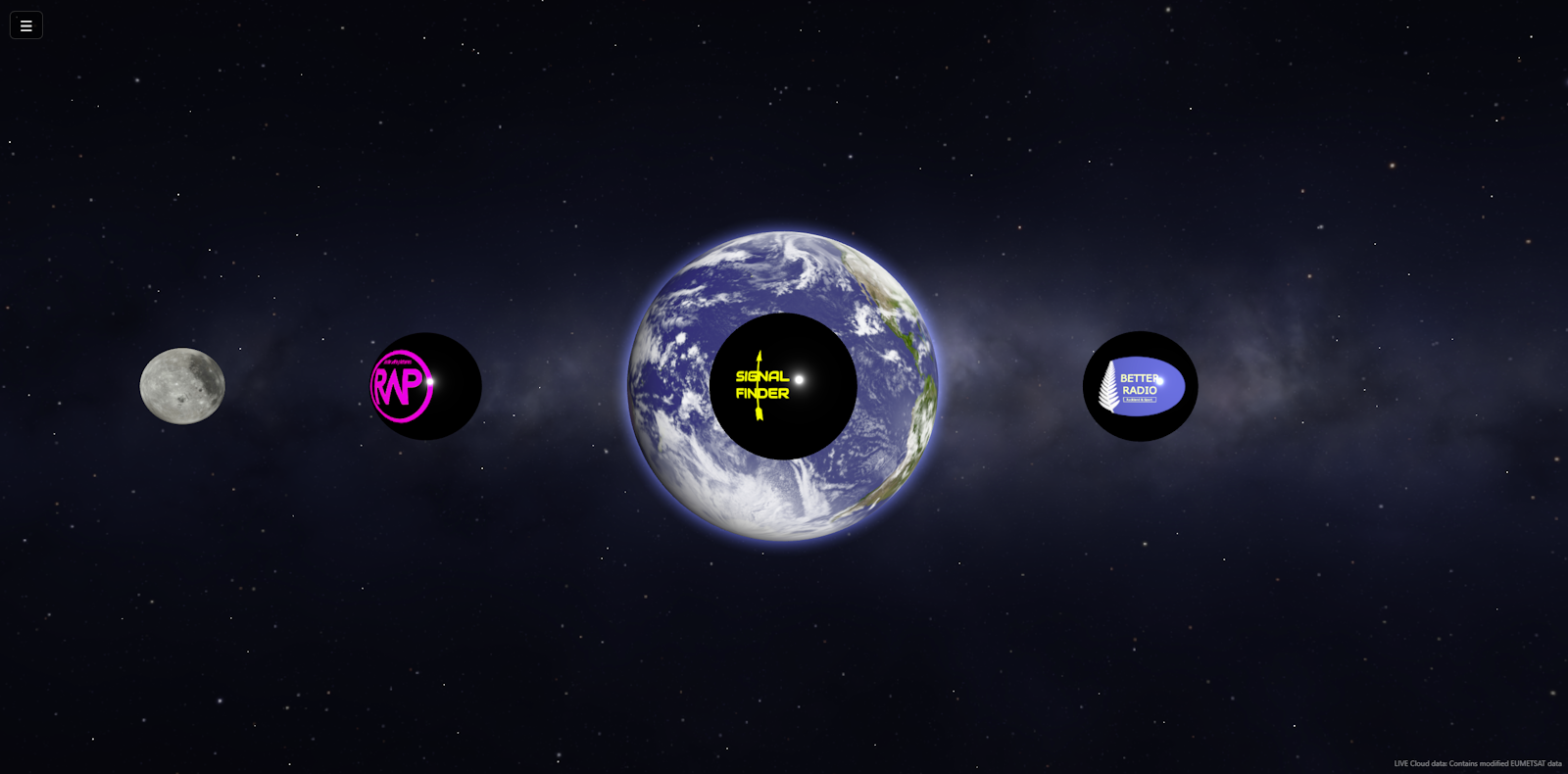
Interactive Portfolio Platform & 3D Navigation
A custom-built portfolio platform designed to present technical systems through an interactive interface. The application uses a Three.js-powered 3D environment as a navigation layer, allowing users to explore projects visually while maintaining a lightweight, fast-loading architecture.
How It Works:
The landing page renders a real-time 3D scene using Three.js, with interactive markers mapped to individual projects. User interaction triggers navigation to detailed project pages, while the underlying site remains a lightweight static structure for performance and simplicity.
Key Technical Decisions:
- Static-First Architecture: Built using HTML5 and CSS3 to minimise overhead, improve load times, and simplify deployment.
- 3D Navigation Layer (Three.js): Implemented a real-time 3D scene with live weather-map textures and interactive markers, acting as a visual navigation layer.
- Self-Hosted Deployment: Hosted on Windows Server with IIS, including subdomain routing and automated SSL via WACS (Let's Encrypt).
- Performance & Simplicity: Avoided heavy frameworks to maintain control over behaviour, loading performance, and long-term maintainability.
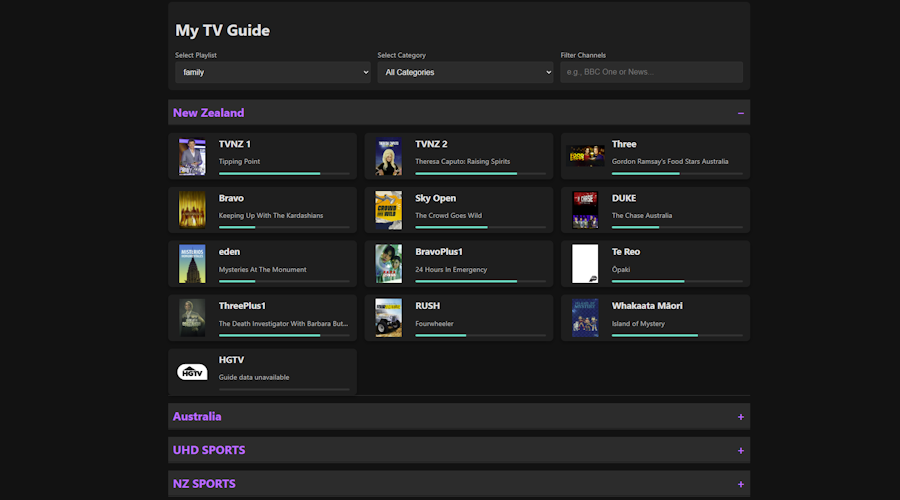
Streaming Content Delivery & Management Platform
A self-hosted streaming delivery platform that ingests program guide data, processes playlist metadata, and provides controlled access to playlists and guide data through a custom ASP.NET Core API. The system enforces authentication, session control, and delivery rules to prevent unauthorized usage while maintaining reliable access for approved clients.
How the System Works:
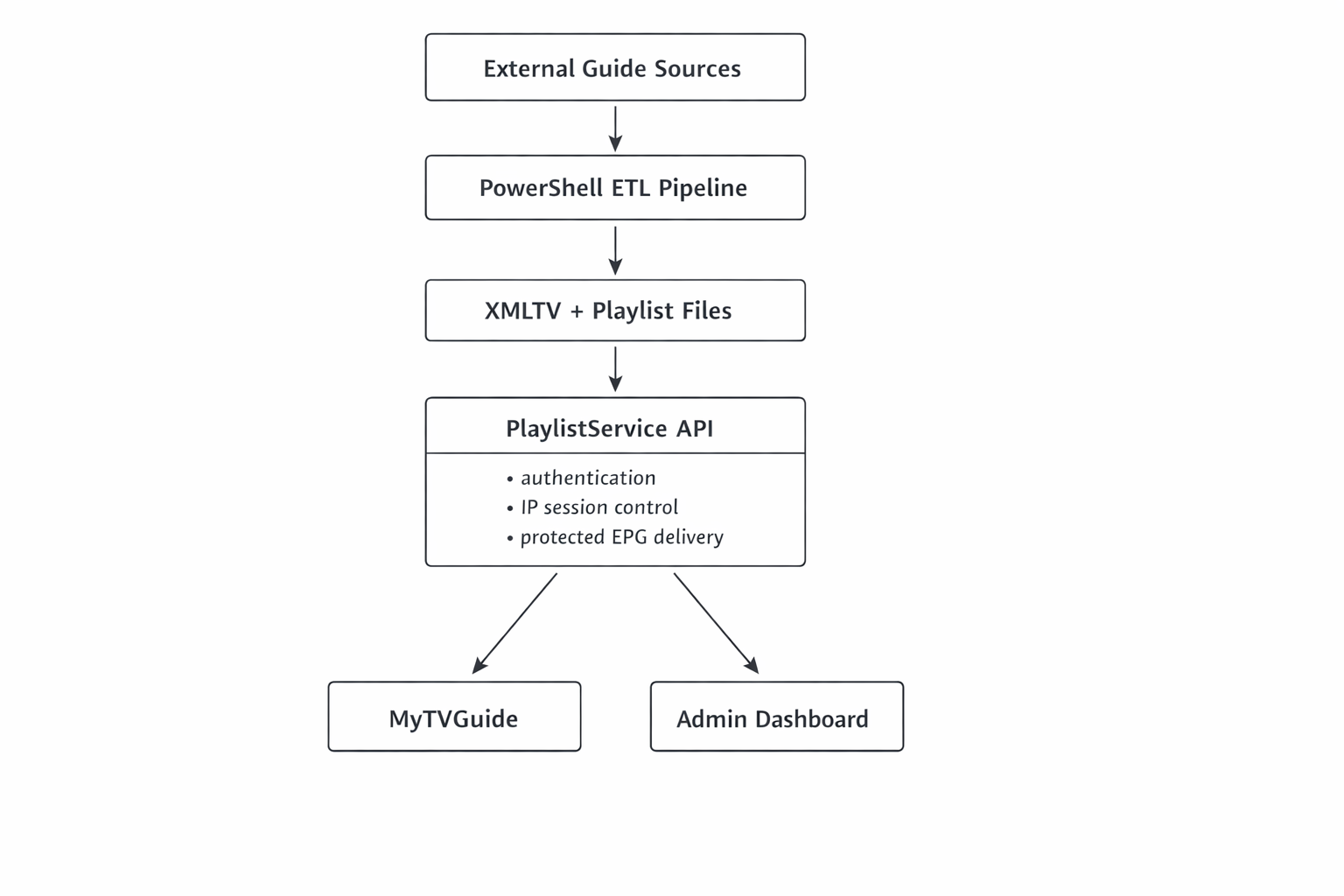
External EPG and playlist data is ingested and processed using scheduled PowerShell workflows. The system filters and normalizes this data into a simplified XMLTV guide and playlist format. Client applications authenticate against the API, which validates sessions, enforces connection limits, and serves playlist and guide data only to authorized users.
Key Technical Achievements:
- Automated EPG & Playlist Data Pipeline: Built scheduled PowerShell workflows that ingest large XML and JSON broadcast feeds, parse and filter only the required channels, normalize inconsistent data structures, and generate a smaller unified XMLTV guide and playlist metadata optimized for streaming clients.
- Secure Playlist Delivery Gateway: Built a custom ASP.NET Core API that acts as a controlled delivery layer for streaming playlists, including username/password authentication, per-user connection limits, IP-based session locking, and prevention of unauthorized playlist sharing.
- Protected Program Guide Access: Implemented a secured guide-delivery endpoint that validates active authenticated sessions before serving XMLTV data, helping prevent direct scraping and uncontrolled access to guide information.
- User & Admin Progressive Web Apps: Developed a user-facing PWA for browsing playlists and viewing live schedules, alongside an administrative dashboard for monitoring active sessions, managing users, and resetting connections. All front-end interfaces communicate directly with the secure backend API.
- Self-Hosted Media Platform Architecture: Integrated scheduled automation, secure API delivery, file-based configuration, IIS hosting, and browser-based administration into a lightweight platform designed for practical real-world streaming use.
Access Control & Delivery Model:
The API acts as a gateway between clients and streaming resources. Access is restricted through username/password authentication, IP-based session locking, and per-user connection limits. This prevents playlist sharing and ensures that only active, authenticated sessions can retrieve streaming data.
Operational Considerations:
The system is designed to handle inconsistent upstream data sources and maintain a stable output for client applications. By normalizing input data and enforcing strict access rules at the API layer, it provides a predictable and consistent delivery layer for client applications..
This design separates upstream data handling from client delivery, allowing the platform to absorb source inconsistencies without exposing that complexity directly to users.
The platform is actively used to serve playlist and guide data to multiple clients, demonstrating stable real-world operation.
Architecture Snapshot:
EPG data feeds → PowerShell ETL pipeline → Unified XMLTV guide → ASP.NET Core API gateway → Authenticated playlists & guide delivery → Progressive Web App clients
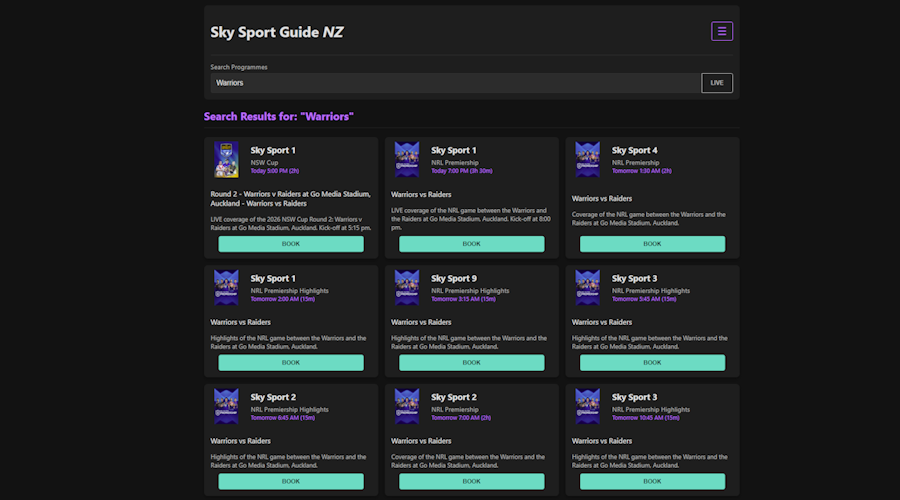
Automated Live Stream Scheduling & Delivery Platform
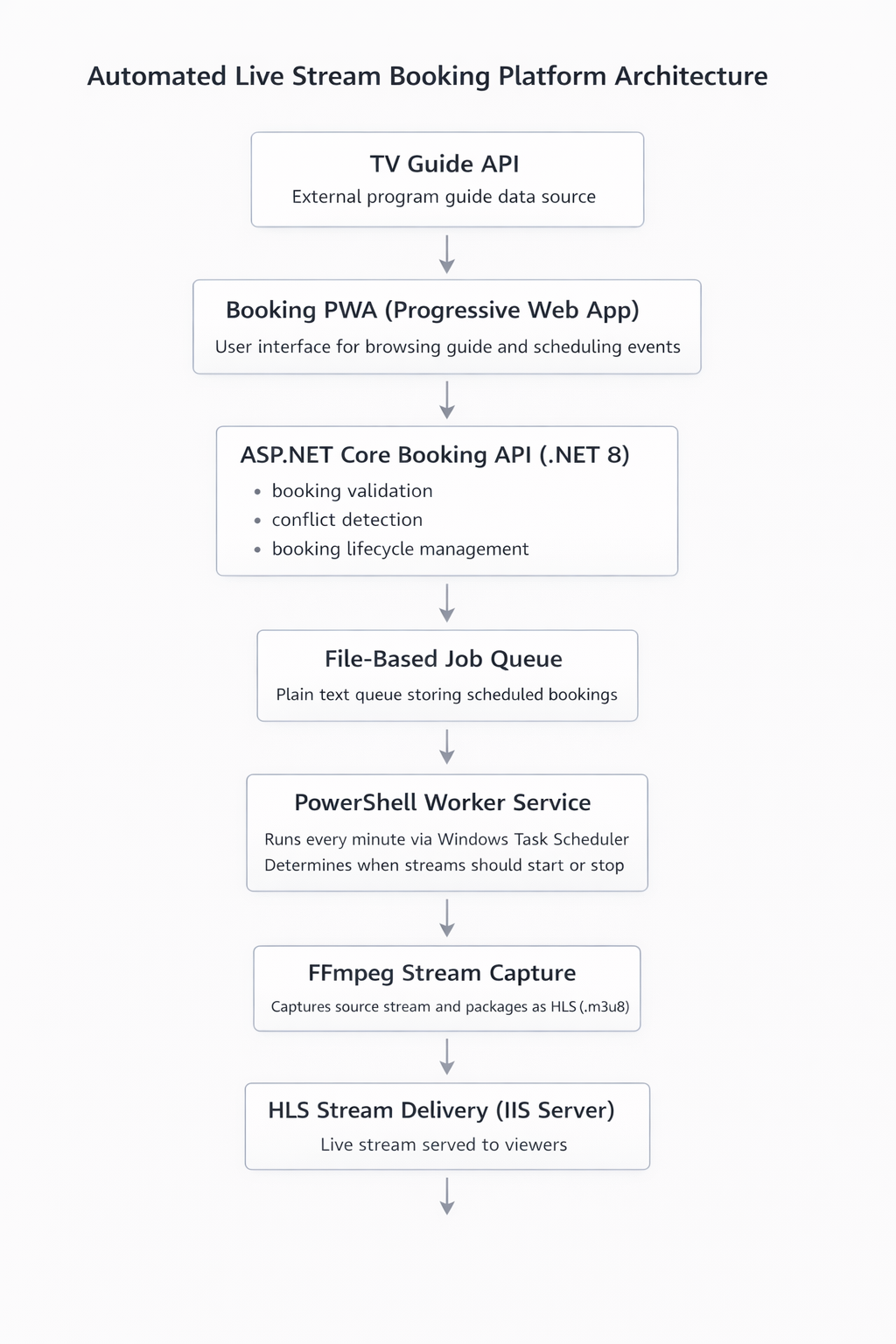
A self-hosted platform for scheduling, capturing, and delivering live television streams with minimal manual intervention. The system combines a Progressive Web App front-end, interacting backend APIs, a polling PowerShell worker, and FFmpeg-based media processing to coordinate guide data, bookings, stream allocation, and browser-compatible playback.
How the System Works:
Users browse live programme guide data through the Booking PWA and schedule events for recording or viewing. The Booking API validates the request, prevents scheduling conflicts, and assigns the booking to an available stream slot. A background PowerShell worker polls the booking data every minute to determine if a stream should start or stop. When active, it launches the appropriate channel-specific stream script, which uses FFmpeg to capture the source transport stream and generate an HLS output served via IIS. When the booking ends, the system stops the stream, records the completed booking, and restores a fallback feed.
Key Technical Achievements:
- Custom ASP.NET Core Booking API (.NET 8): Designed and implemented a RESTful API that powers the booking workflow, serves live guide data, validates booking requests, prevents scheduling conflicts, assigns stream slots, and manages the full booking lifecycle.
- Interacting API Architecture: Integrated TV guide data, playlist services, booking workflows, and playback information so multiple backend services work together as a coordinated streaming platform.
- Polling-Based Scheduling Automation (PowerShell): Built a lightweight worker process that polls booking data every minute and decides when streams should start or stop without creating separate scheduled tasks for each booking.
- Dynamic Stream Slot Allocation: Implemented A/B stream assignment logic to support overlapping bookings, allowing simultaneous captures while preventing stream conflicts.
- Automated Stream Capture & Re-Streaming (FFmpeg): When a booking becomes active, the worker launches a channel-specific PowerShell script that executes FFmpeg to capture the source transport stream and package it as a live HLS (.m3u8) stream served from the local IIS server.
- Automatic Stop, Archiving & Off-Air Fallback: When a booking ends, the system stops the active stream, archives completed bookings to a history log, and restores a pre-generated off-air HLS stream so the public endpoint always serves a valid stream.
- API-Driven PWA Front-End: Developed a mobile-friendly Progressive Web App that consumes the custom API to display a searchable live sports guide, highlight live events, manage active bookings, and provide direct live playback access.
- End-to-End Platform Integration: Integrated a user-facing PWA, TV guide services, Booking API, file-based booking data, PowerShell worker layer, channel-specific stream scripts, FFmpeg media processing, and IIS-hosted HLS delivery into a single automated workflow.
System Design Decisions:
- Worker-based scheduling instead of per-job task creation: Replaced dynamic task-per-booking scheduling with a persistent polling worker model to reduce complexity, improve reliability, and make the system easier to debug.
- File-based booking data: Bookings are stored in a plain-text log, keeping the system transparent, lightweight, and easy to inspect without adding unnecessary database dependencies.
- Separation of responsibilities: The API handles validation, booking logic, and stream assignment, while execution is delegated to the worker layer and channel-specific stream scripts.
- Off-air fallback stream: When no booking is active, the platform automatically restores a standby HLS stream so users always receive a valid stream rather than a broken or stale playlist.
Real-World Usage:
The platform is used to automate the capture and delivery of live sports broadcasts. Users can browse the live guide, schedule events in advance, and allow the system to handle stream startup, delivery, shutdown, and fallback automatically. Once configured, the platform is designed to run unattended with minimal manual intervention.
Operational Considerations:
The system is designed to run unattended, with the worker maintaining state between polling cycles and ensuring only the correct stream processes are active. It includes safeguards to prevent duplicate streams, support overlapping bookings, and recover cleanly when bookings start or end.
Architecture Snapshot:
TV Guide API + Playlist Service → Booking PWA → ASP.NET Core Booking API → File-based booking data → PowerShell polling worker → Stream slot allocation → Channel scripts → FFmpeg stream capture → HLS delivery via IIS → Live playback
External Integration:
The system captures live transport streams from external tuner and broadcast sources and processes them using FFmpeg. It is designed to handle variable stream quality and availability while maintaining reliable HLS output for browser and mobile playback.

NZ TV Signal Finder - PWA
A Progressive Web App designed to help users align TV antennas by combining live device sensors, location data, and transmitter calculations in a mobile-friendly interface. The application turns browser-based sensor and GPS input into a practical field tool for real-world signal alignment.
How It Works:
The application reads the user’s live GPS position and device orientation, then calculates the distance and bearing to known TV transmitter sites in real time. This data is processed in the browser and presented as a directional guide, allowing the user to physically align an antenna using live handset feedback.
Key Technical Achievements:
- Sensor Integration: Uses
DeviceOrientationEventto provide live compass bearing, enhanced with a custom EWMA smoothing filter and magnetic declination compensation. - Real-Time Geo-Computation: Uses JavaScript-based distance and bearing calculations to determine transmitter direction from the user’s current GPS position.
- Mobile Event Handling: Diagnosed and resolved a persistent mobile touch-event race condition ("phantom click") affecting reliability on specific iOS devices.
- PWA Architecture: Built as an installable Progressive Web App using a Service Worker for offline-capable operation and reliable mobile access.
- Implementation Stack: Vanilla JavaScript, HTML5, CSS3, JSON data handling.
Better Radio PlatformStreaming & Metadata Aggregation
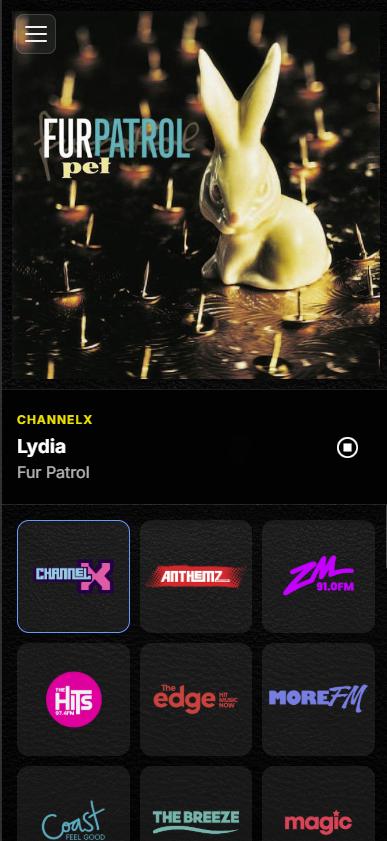
A web-based radio platform combining a custom ASP.NET Core API with a Progressive Web App to provide consistent audio streaming and real-time metadata. The system resolves dynamic stream sources, aggregates data from multiple providers, and delivers a stable playback experience across devices.
How It Works:
The backend API aggregates metadata from multiple broadcaster sources and resolves stream URLs server-side, handling redirects and inconsistencies. The client application consumes this unified API, providing playback through HLS.js with fallback support, while authentication and proxy logic ensure controlled and reliable stream access.
Key Technical Achievements:
- Metadata Aggregation: Normalises "Now Playing" data from multiple external APIs into a consistent format with unified artwork and track information.
- Dynamic Stream Resolution: Resolves frequently changing stream URLs server-side, ensuring stable playback despite upstream changes.
- Proxy-Based Stream Handling: Implements conditional proxying to handle browser and session limitations while minimising unnecessary server load.
- Cross-Browser Playback: Uses HLS.js with native audio fallback to support desktop and mobile environments.
- Authentication & Access Control: Secures restricted streams using a custom authentication layer with protected credential storage.
- PWA Architecture: Installable Progressive Web App using a Service Worker for caching and fast load times.
System Role:
This platform acts as the core radio service layer, supporting multiple client interfaces including the in-car media dashboard and browser-based player.

In-Car Media Hub – Radio Streaming Dashboard (PWA)
A Progressive Web App designed for in-vehicle use, combining streaming radio, live metadata, and location awareness into a simplified dashboard interface. The system consumes a custom radio API and adapts browser capabilities to provide a stable, media-focused experience on Android head units.
How It Works:
The application connects to a custom backend API to retrieve station streams and metadata, while simultaneously using browser geolocation to track position in real time. Location data is processed and reverse-geocoded to display current road information, and the interface updates dynamically to reflect playback state and environment conditions.
Key Technical Achievements:
- API-Driven Media Playback: Uses a custom radio streaming API to provide consistent access to station streams and live metadata.
- Location Integration: Uses
watchPosition()with reverse geocoding (OpenStreetMap Nominatim) to display real-time road and location context. - PWA for Embedded Environments: Built as an installable Progressive Web App with full-screen behaviour suitable for Android head units.
- Adaptive Interface: Implements automatic day/night mode using
prefers-color-schemewith time-based fallback. - Media Playback Stack: HTML5 audio with HLS.js, Vanilla JavaScript, CSS3.
Design Focus:
The interface is designed for quick interaction and minimal distraction, prioritising large controls, clear metadata, and immediate access to preset stations for in-car use.
Live TV Streaming Demo – EPG & Playback Platform (PWA)
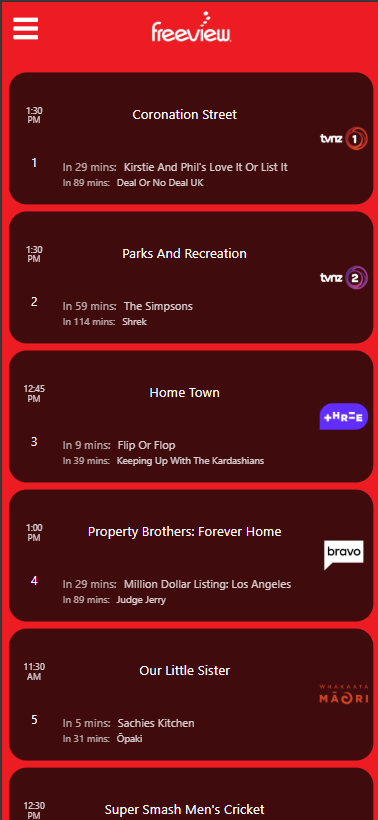
A Progressive Web App built as a technical demonstration of live stream playback, electronic program guide (EPG) integration, and real-time media delivery. The system combines backend data processing with a lightweight client interface to simulate a live TV viewing experience.
How It Works:
The application consumes structured EPG data generated from backend processing pipelines and pairs it with live stream sources. The client dynamically renders program schedules while handling HLS playback using adaptive bitrate streaming, allowing smooth viewing across devices.
Key Technical Achievements:
- Dynamic EPG Rendering: Parses and displays structured program data in real time, including current and upcoming shows.
- HLS Playback & ABR: Implements adaptive bitrate streaming to maintain stable playback across varying network conditions.
- Frontend Media Handling: Uses Video.js and browser APIs to manage playback state, buffering, and user interaction.
- PWA Architecture: Built as an installable Progressive Web App with Service Worker caching for fast load times and offline capability.
- Backend Data Integration: Relies on scheduled processing of XML/JSON feeds to generate structured guide data for the client.
Project Context:
This project is intended as a technical demonstration of streaming and guide integration rather than a production service. It focuses on solving playback reliability, data handling, and real-time UI challenges in a browser-based environment.
Live TV Streaming Demo (AU) – Multi-Region EPG & Playback
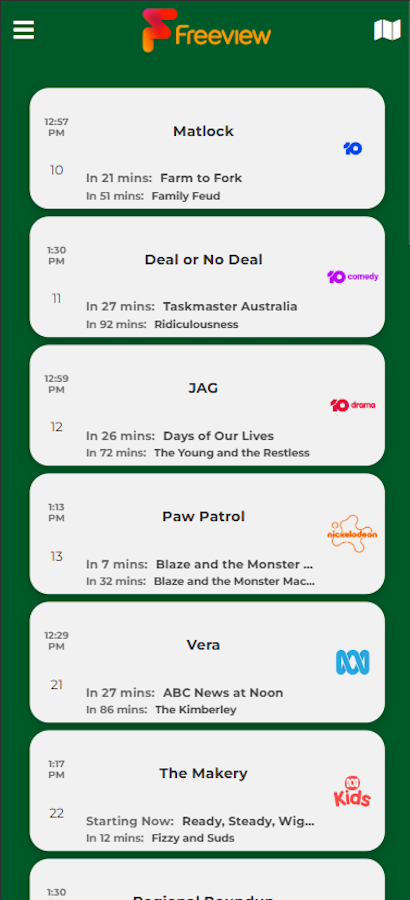
A Progressive Web App demonstrating live stream playback and multi-region electronic program guide (EPG) integration. The system extends the core streaming demo by supporting dynamic region selection, allowing users to switch between different broadcast markets.
How It Works:
The application retrieves region-specific program data and stream sources, allowing users to select a broadcast region and dynamically load the corresponding schedule and channels. The client processes this data in real time while handling HLS playback with adaptive bitrate streaming for consistent performance across devices.
Key Technical Achievements:
- Multi-Region EPG Handling: Dynamically loads and renders program data for different broadcast regions based on user selection.
- Real-Time Data Processing: Parses and updates program schedules in the browser, including live timing and upcoming content.
- Cross-Browser HLS Playback: Uses HLS.js with native fallback for reliable playback across desktop and mobile browsers.
- Frontend Media Handling: Manages playback state, buffering, and autoplay constraints using modern JavaScript patterns.
- PWA Architecture: Installable Progressive Web App with Service Worker support for caching and fast load times.
Project Context:
This project extends the core streaming demo to support multiple broadcast regions, demonstrating how a single client can adapt to different data sources and viewing contexts. It is intended as a technical demonstration of flexible data handling and streaming integration rather than a production service.
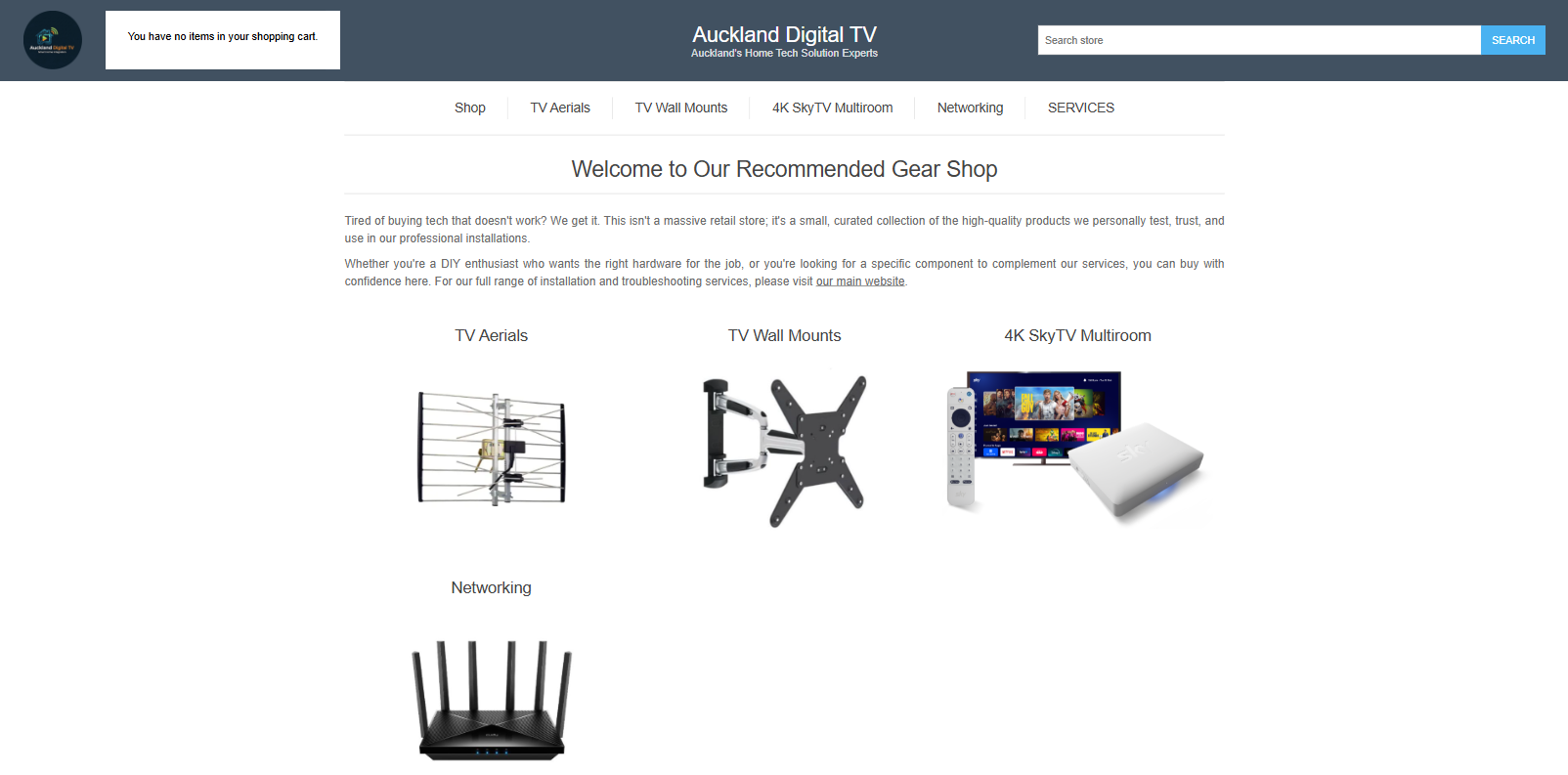
Self-Hosted E-Commerce Platform (nopCommerce)
A self-hosted e-commerce platform built on nopCommerce, demonstrating deployment, configuration, and customization of a large ASP.NET application. The project focuses on adapting an existing system to real-world requirements, including hosting, payments, and operational management.
How It Works:
The platform is deployed on a Windows Server environment using IIS and SQL Server, with configuration handled across application, database, and server layers. Customisations are applied at both the application level (theme and templates) and infrastructure level, enabling a fully functional online store with integrated payment processing.
Key Technical Achievements:
- Platform Deployment: Installed and configured nopCommerce on a self-managed IIS and SQL Server environment.
- System Configuration: Set up catalog structure, shipping, tax, and operational settings for a working e-commerce workflow.
- Payment Integration: Integrated and validated PayPal Commerce workflows, including sandbox testing and production configuration.
- Customisation: Modified Razor templates (
.cshtml) and CSS to tailor the storefront to specific requirements. - Infrastructure Management: Managed HTTPS, application pools, and deployment configuration within a self-hosted environment.
- Troubleshooting: Diagnosed and resolved complex environment and configuration issues across IIS, SQL Server, and application layers to achieve a stable deployment.
System Role:
This project demonstrates the ability to work with and extend large existing systems, integrating infrastructure, application configuration, and customisation to deliver a complete, production-ready solution.